Context
The platform serves 7,600 user licenses and 2,000+ user role configurations.
Another department, the Sales Tablet team, rebuilt the front end. My team owned the back office and its services.
The brief was one line: "Redesign the CRM interface to improve usability." I interviewed 20+ stakeholders and users across frontline, ops, supervisors and business owners. The problems sat in the workflow and the operating model.
Five insight themes
2,000+ role configurations. People couldn't reach what their job needed.
Support staff couldn't see what they were meant to support.
Batch jobs and status updates failed with no alert; teams found the errors downstream.
New joiners learned by interrupting colleagues.
Users wanted help analysing customers, spotting opportunities and tracking team health.
Assumptions that didn't survive
How I worked
Every stage ran the same loop, from domain experts to the dev backlog.

I studied Zoho and monday first. Zoho's lead matching became our model, with far fewer fields, and monday's sentence-style recipes shaped the rule editor.
The pipeline
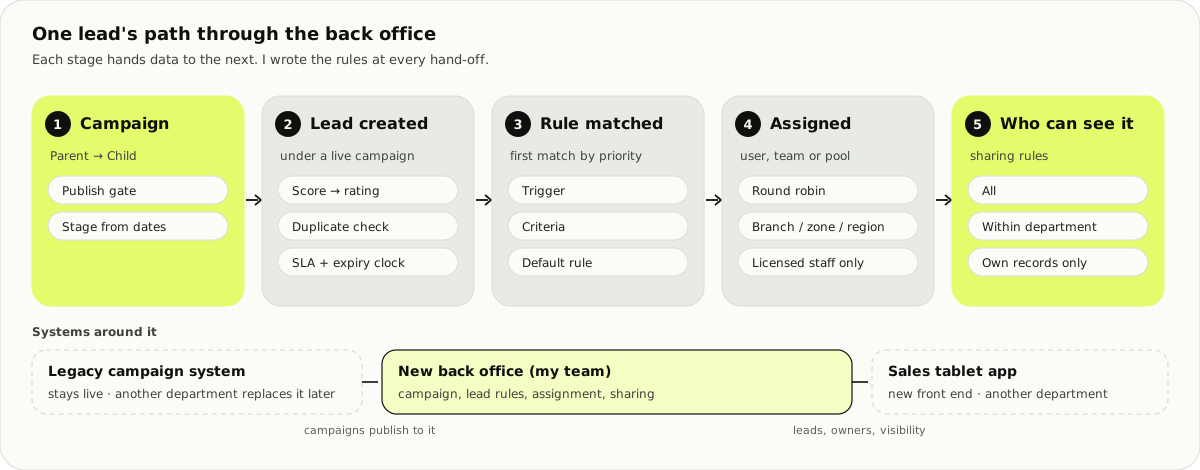
No single team owned the whole path, so I mapped it end to end and wrote the rules at each hand-off.
Stage 1 · Campaign
Keep the marketing team's structure, remove the manual work. The module also had to sync with the legacy campaign system.
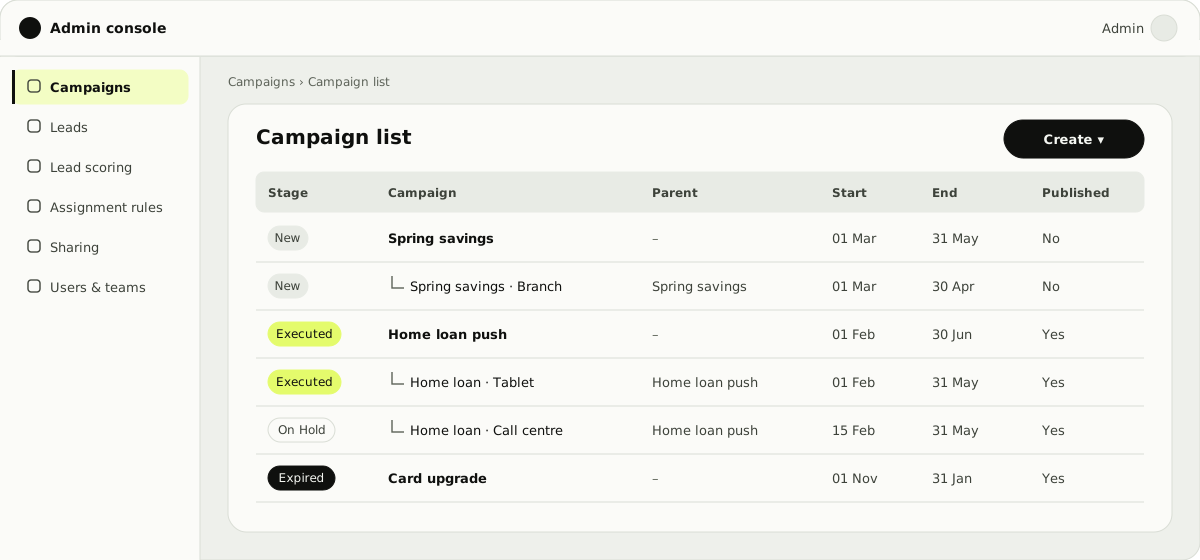
The parent holds structure and dates. The child holds what generates leads: product, channel, sub-type. Marketing already worked this way.
Once published, the data is in the legacy system and leads may exist. End dates can move later, never earlier. Most fields lock at start. Expired and cancelled campaigns are read-only.
A lead can expire with its campaign, so it never outlives it.
The other rules
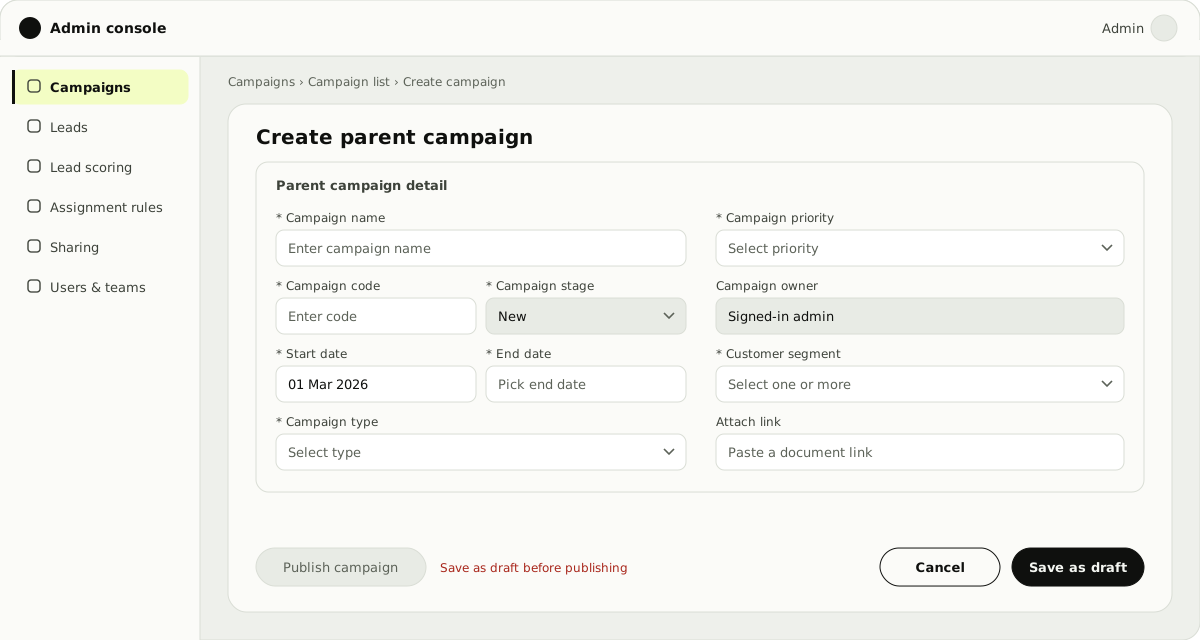
- Publishing needs a saved draft and at least one child campaign.
- A child's dates sit inside its parent's.
- The stage is derived from the dates and the publish status.
- Hold and resume work only on a published child.
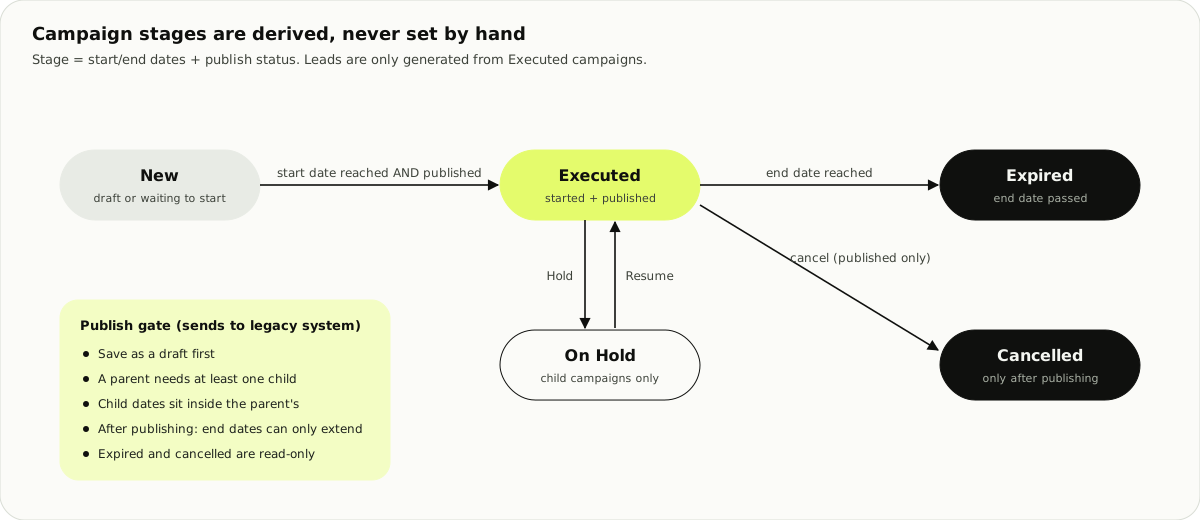
I drew every stage that changes the flow, so business, architect and dev argued over one picture.
Stage 2 · Lead
Score, rating, SLA
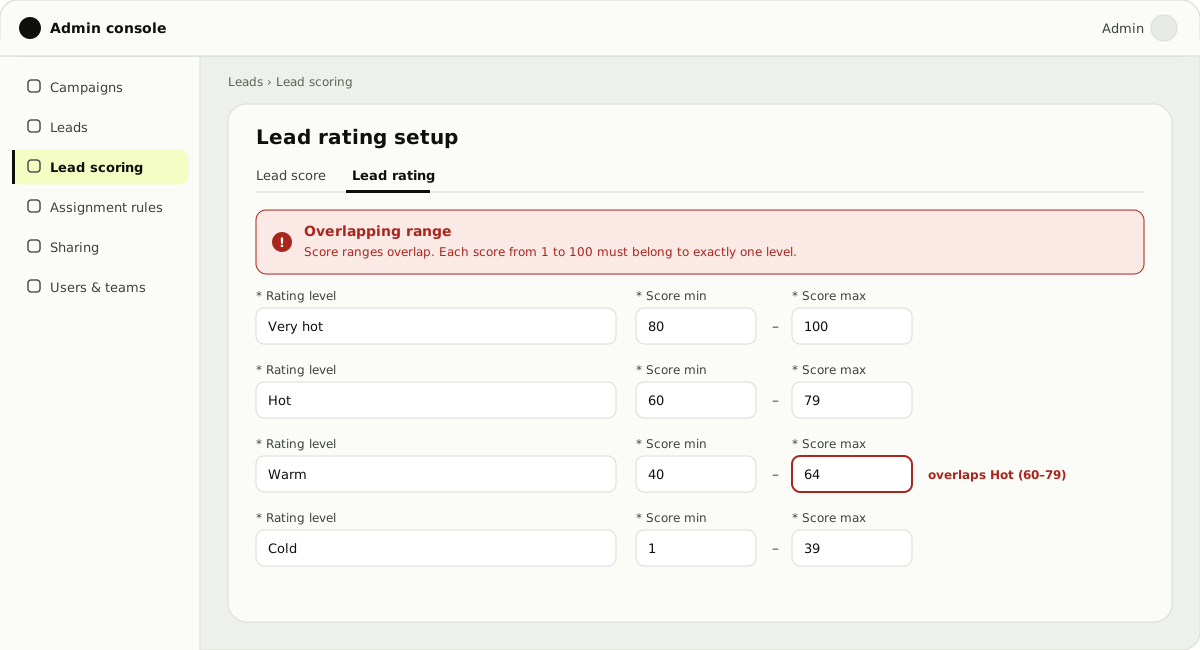
Every new lead gets a score from weighted fields (total 100%). Rating bands, Very hot to Cold, must cover 1 to 100 with no gaps or overlaps, and the rating sets the SLA clock.
Duplicates
Duplicates are checked per lead source, then restaged or sent to a user or team pool.
The smaller rules
| Rule | What it protects |
|---|---|
| SLA by lead type, product and rating | Hot leads get a shorter clock, with a reminder before and an action after |
| Only licensed staff | A lead only goes to staff licensed to sell that product |
| Bulk re-target upload | Rows that pass checks are saved; failed rows come back as a file to fix |
| Expiry | By created date or by campaign end date |
Stage 3 · Match and assign
The riskiest feature: lead assignment rules. Every rule change needed IT, even after hours. The goal: a self-serve engine that routes leads by user, queue, AI model or product.
Criteria use a few operators: null, not null, equal and not equal for text, and ranges for numbers.
How a rule works
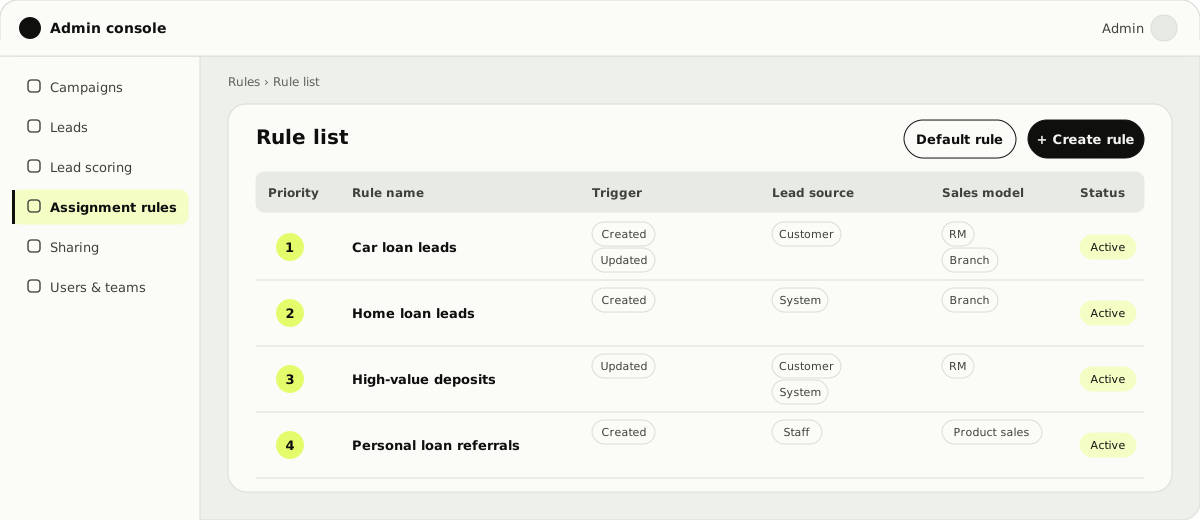
- Rules have a numbered priority. The first rule that matches wins.
- Each rule combines a trigger, a lead source, a sales model and criteria.
- Actions assign the lead, send it on to other systems, notify someone, or run a check.
- The target is a person, a team, or round robin within a group, by branch, zone, region or coverage area.
- A default rule catches leads that match nothing, for example when the named owner is inactive.
I mapped all of this with developers and business owners before drawing a screen, so the spec was clear and we avoided rework.
| Lead | Rule | Expected result |
|---|---|---|
| Home loan, branch "North 1" | Group: lending staff · level: branch · round robin | Next licensed staff member at North 1 |
| Home loan, branch "North 1" | Same, level: zone | Next licensed staff member in North 1's zone |
| Car loan, brand X, district Y | Group: auto staff · coverage area with brand | Next staff member covering district Y who sells brand X |
| Any lead, owner inactive | Assign to named person | Falls to the default rule |
Test setup
| Format | Moderated, in person, on a lo-fi Figma prototype, before development |
|---|---|
| Group A | 3 experienced users: 1+ year of CRM and rule configuration |
| Group B | 5 first-time users, to test learnability from scratch |
| Session | 40–50 minutes, 2 core task flows |
Five iterations from testing
Testing showed friction we couldn't see on our own. Each became a fix before handoff.
5/8 hesitated: default rule or custom rule first?
4/8 read Trigger, Criteria and Action as three unrelated settings.
3/8, all first-timers, couldn't tell "Assign by Queue" from "Assign by Model".
6/8 expected feedback as they filled in criteria.
7/8 never found drag-to-reorder. They expected numbered priorities.
Outcomes
Confidence after the test (1–5)
| Group | Participant | Confidence |
|---|---|---|
| First-time | Beginner A | 3.75 |
| First-time | Beginner B | 3.77 |
| Experienced | Advanced A | 4.4 |
| Experienced | Advanced B | 4.8 |
Stage 4 · Who can see the lead
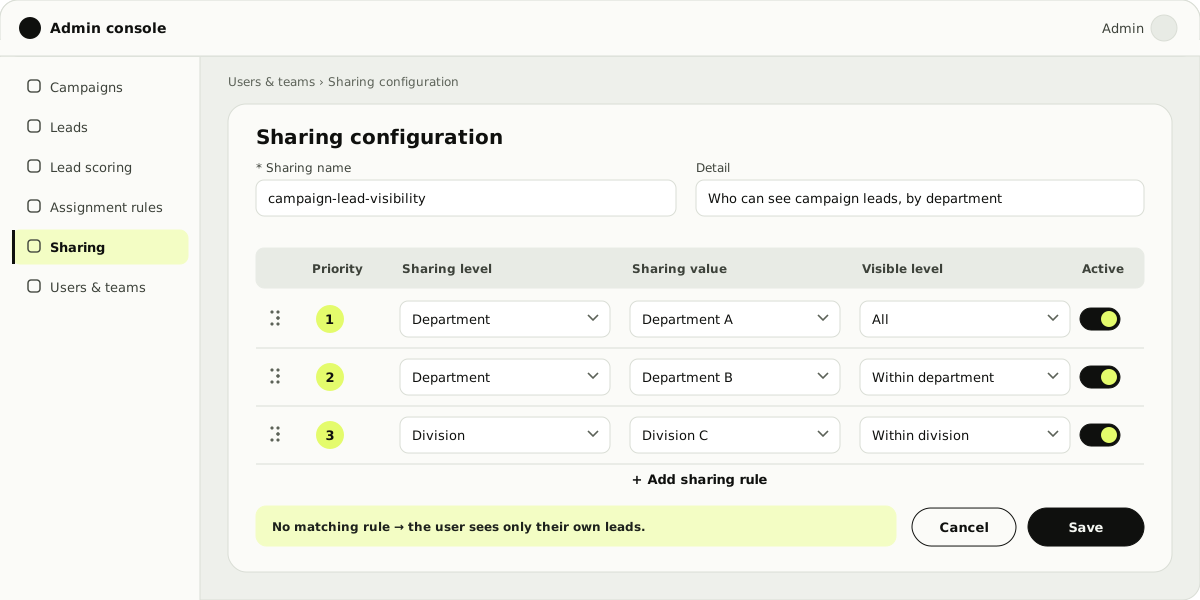
Campaign leads go to sales staff in bulk, and the existing roles couldn't say who should get them. So we grouped staff by department or division.
- Rules run in priority order. Each sets a level, a value and who sees the lead: everyone, or only the same department or division.
- With no matching rule, a user sees only their own leads.
- A rule does nothing until a module reads it, so modules could adopt sharing one at a time.
| User's department | Rule | Sees |
|---|---|---|
| Department A | All | Every lead |
| Department B | Within department | Leads in Department B |
| Department D | (no rule) | Only their own leads |
One lead's audit trail
| Event | By | Detail |
|---|---|---|
| Lead created | System | Under campaign "Home loan · Tablet" |
| Rule matched | System | Rule 2 "Home loan leads" → team pool |
| Sent on | System | Distributed to the sales system |
| Picked up | Staff | Owner set to a sales staff member |
| Re-assigned | Manager | Owner changed |
| Status updated | Staff | New → Offered |
UAT and handover
All four areas reached UAT before my contract ended in June 2026. I logged the business impact of every carried-over item and must-have gap, so the team knew what to do next.
Deliverables
End to end, customer and service
Role-based, per user type
Frontstage, backstage, support systems
By epic and feature
Prioritised, with acceptance criteria
Ready for 6 development teams
What I learned
Fix the workflow before the screen.From the CRM discovery
The brief asked for a new interface. The interviews showed the problems sat in roles, hand-offs and policy, so I mapped the whole lead path and wrote the rules at each hand-off before drawing screens.